UnitiqVastgoed

Brand identity

Brand book

This page holds every official logo version of Unitiq Vastgoed together with guidelines for correct use. Always use one of these versions; never modify the logo yourself.

The symbol

The symbol is a single unit block holding four connected units: the modular real estate we develop and the thinking (IQ) behind site selection, development and investment. The yellow unit always marks the brand accent.

Default profile picture for LinkedIn, Google and WhatsApp: anthracite symbol on a light background. The download is a square canvas with the symbol centred; platforms crop it to a circle themselves.

Simplified symbol

Four separate units without connecting lines, one in signal yellow. Use this version small: vehicle lettering, embroidery, textile print, engraving and sizes below 24 px.

Download
Background

SVG is the vector file: open or place it directly in Illustrator (Ai). Web = compact for screen, print = high resolution (300 dpi). SVG, PNG and WEBP export transparent; JPG always uses the selected background colour.
Logo versions

  • UnitiqVastgoed

    Primary logo

    Default version on a light background. Use this version wherever possible: website, presentations and correspondence.

    Download
    Background

    SVG is the vector file: open or place it directly in Illustrator (Ai). Web = compact for screen, print = high resolution (300 dpi). SVG, PNG and WEBP export transparent; JPG always uses the selected background colour.

  • UnitiqVastgoed

    Logo on a dark background

    For dark surfaces and photography. White wordmark with a yellow accent in the symbol.

    Download
    Background

    SVG is the vector file: open or place it directly in Illustrator (Ai). Web = compact for screen, print = high resolution (300 dpi). SVG, PNG and WEBP export transparent; JPG always uses the selected background colour.

  • UnitiqVastgoed

    Logo on a light background

    Anthracite wordmark with a yellow accent on offwhite or white. Ensure sufficient contrast with the background.

    Download
    Background

    SVG is the vector file: open or place it directly in Illustrator (Ai). Web = compact for screen, print = high resolution (300 dpi). SVG, PNG and WEBP export transparent; JPG always uses the selected background colour.

  • UnitiqVastgoed

    Wordmark (text only)

    Without the symbol, for narrow applications such as email signatures or banners.

    Download
    Background

    SVG is the vector file: open or place it directly in Illustrator (Ai). Web = compact for screen, print = high resolution (300 dpi). SVG, PNG and WEBP export transparent; JPG always uses the selected background colour.

  • Symbol (icon only)

    For favicons, social avatars and places where the name already appears elsewhere. Never smaller than 16 px.

    Download
    Background

    SVG is the vector file: open or place it directly in Illustrator (Ai). Web = compact for screen, print = high resolution (300 dpi). SVG, PNG and WEBP export transparent; JPG always uses the selected background colour.

  • UnitiqVastgoed

    Monochrome (black)

    Single-colour black for stamps, engraving and black-and-white printing.

    Download
    Background

    SVG is the vector file: open or place it directly in Illustrator (Ai). Web = compact for screen, print = high resolution (300 dpi). SVG, PNG and WEBP export transparent; JPG always uses the selected background colour.

  • UnitiqVastgoed

    Monochrome (white)

    Single-colour white for dark surfaces without the accent colour.

    Download
    Background

    SVG is the vector file: open or place it directly in Illustrator (Ai). Web = compact for screen, print = high resolution (300 dpi). SVG, PNG and WEBP export transparent; JPG always uses the selected background colour.

  • Avatar (light)

    Default profile picture for LinkedIn, Google and WhatsApp: anthracite symbol on a light background. The download is a square canvas with the symbol centred; platforms crop it to a circle themselves.

    Download
    Background

    SVG is the vector file: open or place it directly in Illustrator (Ai). Web = compact for screen, print = high resolution (300 dpi). SVG, PNG and WEBP export transparent; JPG always uses the selected background colour.

  • Avatar (dark)

    Alternative profile picture for dark environments: light symbol with yellow accent on anthracite. Use it only when the light avatar lacks contrast.

    Download
    Background

    SVG is the vector file: open or place it directly in Illustrator (Ai). Web = compact for screen, print = high resolution (300 dpi). SVG, PNG and WEBP export transparent; JPG always uses the selected background colour.

  • UnitiqVastgoed

    Unitiq Vastgoed B.V. · Dennenlaan 15 · 2244 AK Wassenaar
    KvK 98646303 · BTW NL868583121B01 · info@unitiq.nl

    Logo for invoices and documents

    Compact, quiet version with company details. Place it at the top left of invoices, letters and agreements.

    Download
    Background

    SVG is the vector file: open or place it directly in Illustrator (Ai). Web = compact for screen, print = high resolution (300 dpi). SVG, PNG and WEBP export transparent; JPG always uses the selected background colour.

Clear space and minimum size

  • Keep clear space around the logo of at least the height of the symbol.
  • Minimum width of the full logo: 110 px on screen, 28 mm in print.
  • Minimum size of the symbol: 16 px on screen, 6 mm in print.
UnitiqVastgoed

Colours

  • Charcoal

    #17191B

    Base colour, dark surfaces and text

  • Signal Yellow

    #F5C518

    Accent, node in the symbol, CTAs

  • Offwhite

    #F4F2ED

    Light background

  • Concrete

    #B8B8B3

    Secondary text and rules

Typography

Manrope ExtraBold for the wordmark and headings, Medium and Regular for body copy. The wordmark is set in capitals with generous letter spacing; the VASTGOED subline is always smaller with wider tracking.

Unitiq

Download the typeface

Manrope is free under the SIL Open Font License. Download the full family from Google Fonts and install at least Medium (500) and ExtraBold (800).

Our social media bio

Fixed copy for the Facebook business page (Pages › Create a Page). Use it exactly as written so every field stays within Facebook's character limits.

  • Page name (required)

    15/75 characters

    Unitiq Vastgoed

    Exact company name, without additions such as B.V. or a city.

  • Category (required, max. 3)

    Commercial Real Estate Agency · Real Estate Developer · Real Estate Company

    Enter them in this order; Facebook allows three categories at most.

  • Bio (optional)

    199/255 characters

    Unitiq Vastgoed develops modern business units and commercial real estate in the Netherlands. With over 25 years of experience in project management, construction supervision and property investment.

    The field from the screenshot. Facebook allows up to 255 characters here.

  • Short bio (101 characters)

    87/101 characters

    Developer of modern business units and commercial real estate. 25+ years of experience.

    For places where Facebook truncates the bio, such as the mobile app and search.

  • About / description

    220/255 characters

    Unitiq Vastgoed B.V. develops and delivers modern business units and commercial real estate. From site selection and design to construction supervision and handover. Interested in buying or renting? Email info@unitiq.nl.

    Longer copy for the page's About tab.

  • Instagram bio (150 characters)

    134/150 characters

    Developer of modern business units and commercial real estate in NL. 25+ years of experience. Units for sale or lease ✉ info@unitiq.nl

    Instagram allows only 150 characters; this version stays just under it and also works on TikTok and X.

  • Username (@handle)

    14/50 characters

    unitiqvastgoed

    5–50 characters, letters, numbers and full stops only. Keep it identical across channels.

  • Website

    https://www.unitiq.nl

    Always include https:// so Facebook validates the link correctly.

Facebook image sizes

  • Profile picture: 512 × 512 px (square) — use the avatar download on this page.
  • Cover photo: 1640 × 856 px; keep the logo out of the bottom 120 px.
  • Shared link (OG image): 1200 × 630 px.

og:image & social images

Recognisable share images built on the Deventer render: charcoal facades with signal yellow, a dark gradient for legibility and the logo exactly centred. The logo sits inside a 60% safe zone — even when a platform crops the image square or wide, it stays fully visible.

  • og:image — with logo

    1200 × 630 px

    Default share image for links on LinkedIn, X, WhatsApp and Facebook.

    Download
    1200 × 630
  • og:image — clean

    1200 × 630 px

    Same image without the logo, for when you add your own headline or campaign copy.

    Download
    1200 × 630
  • Square — with logo

    1200 × 1200 px

    Feed post for Instagram and Facebook; the logo stays centred in any crop.

    Download
    1200 × 1200
  • Square — clean

    1200 × 1200 px

    Square atmosphere image without the logo, ideal as a background for your own layout.

    Download
    1200 × 1200
  • Facebook cover — with logo

    1640 × 856 px

    Logo placed slightly higher so the profile picture and buttons never overlap it.

    Download
    1640 × 856
  • Facebook cover — clean

    1640 × 856 px

    Wide cover without the logo; pair it with the avatar as profile picture.

    Download
    1640 × 856

Variant 1 (1200 × 630) is the og:image for unitiq.nl. Note that platforms cache a shared preview — use the platform's link preview debugger to refresh it after a change.

QR code

Icon mark

One fixed QR code for all print, the van and workwear. It opens unitiq.nl with UTM parameters, so analytics show when a visitor arrives through a QR code. Error correction is set to level H, which keeps the code readable with the icon mark in its centre and even when scratched or dirty.

Target URL with tracking

https://unitiq.nl/?utm_source=qr&utm_medium=print&utm_campaign=unitiq_qr

  • Charcoal on white

    Default. For business cards, signage, leaflets and vinyl on light surfaces.

    Download
  • Charcoal, transparent

    The same code without a background, to place on a light photo or your own colour block.

    Download
  • White on charcoal

    For dark carriers. Note: some older scanners struggle with inverted codes — always test.

    Download

Use SVG for print (vector, infinitely scalable; that variant is always without the icon mark for maximum scan reliability). Print the code at 25 × 25 mm or larger, keep a quiet zone of four modules around it and always test the printed result on two phones.

Brand applications

How the brand looks in the field: the company van and the workwear. The images are visualisations; the files you download are the actual artwork for the vinyl wrapper and the garment printer.

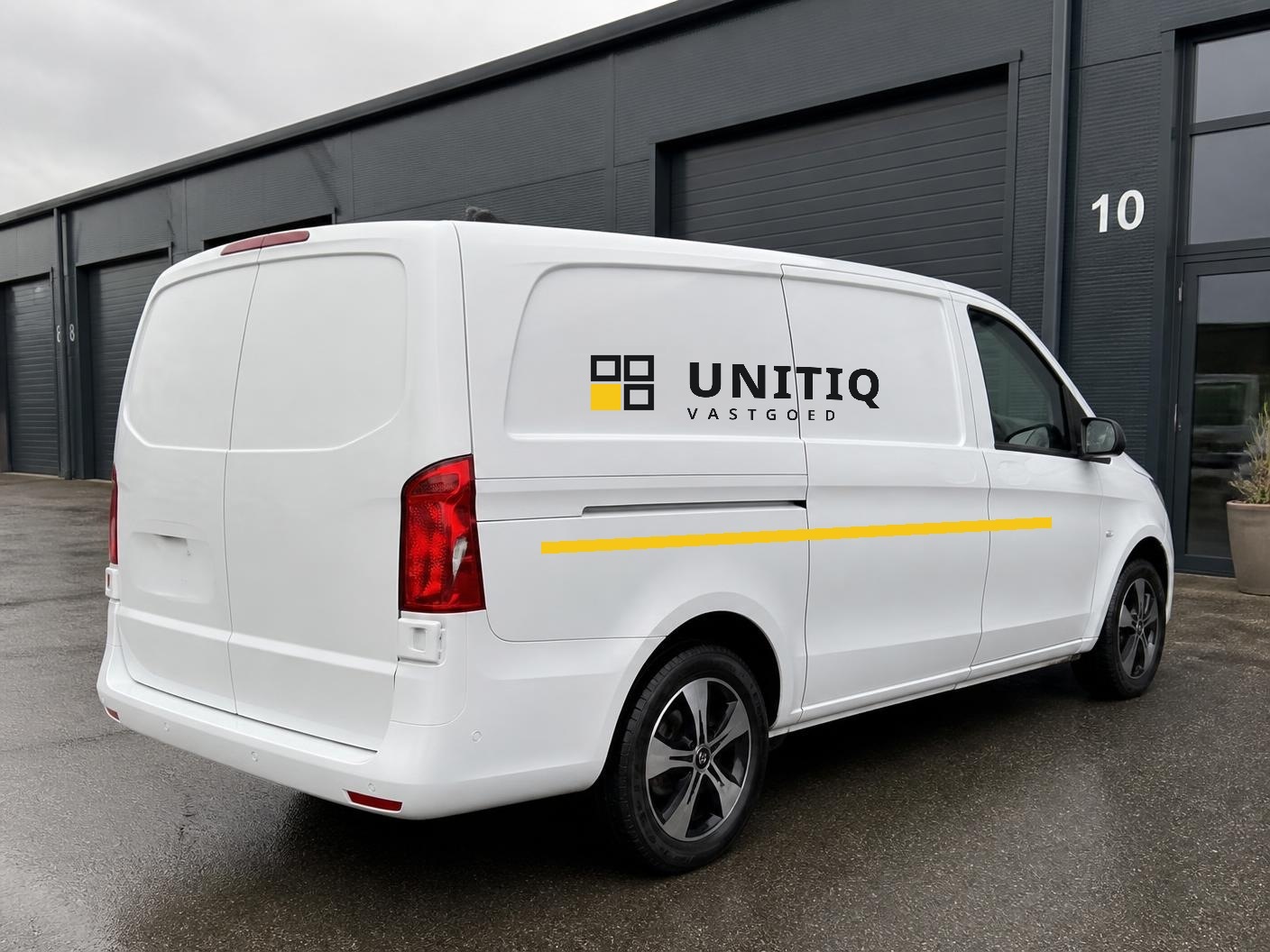
Company van — white eVito

Company van — white eVito

White van, large charcoal logo on the side and a single yellow accent line low on the flank. No QR code on the van — the image stays calm and the logo does the work.

  • Side logo: 90–110 cm wide, centred on the sliding-door panel, at least 10 cm of clear space around it.
  • Mark and wordmark on one baseline; wordmark in charcoal #17191B with one square in signal yellow #F5C518.
  • Yellow accent line: 4 cm high in signal yellow #F5C518, running across the full flank.
  • Supply vector artwork (SVG) to the vinyl wrapper; matte charcoal RAL 7016 and signal yellow film.

Files for vehicle lettering (charcoal logo)

Download
Background

SVG is the vector file: open or place it directly in Illustrator (Ai). Web = compact for screen, print = high resolution (300 dpi). SVG, PNG and WEBP export transparent; JPG always uses the selected background colour.

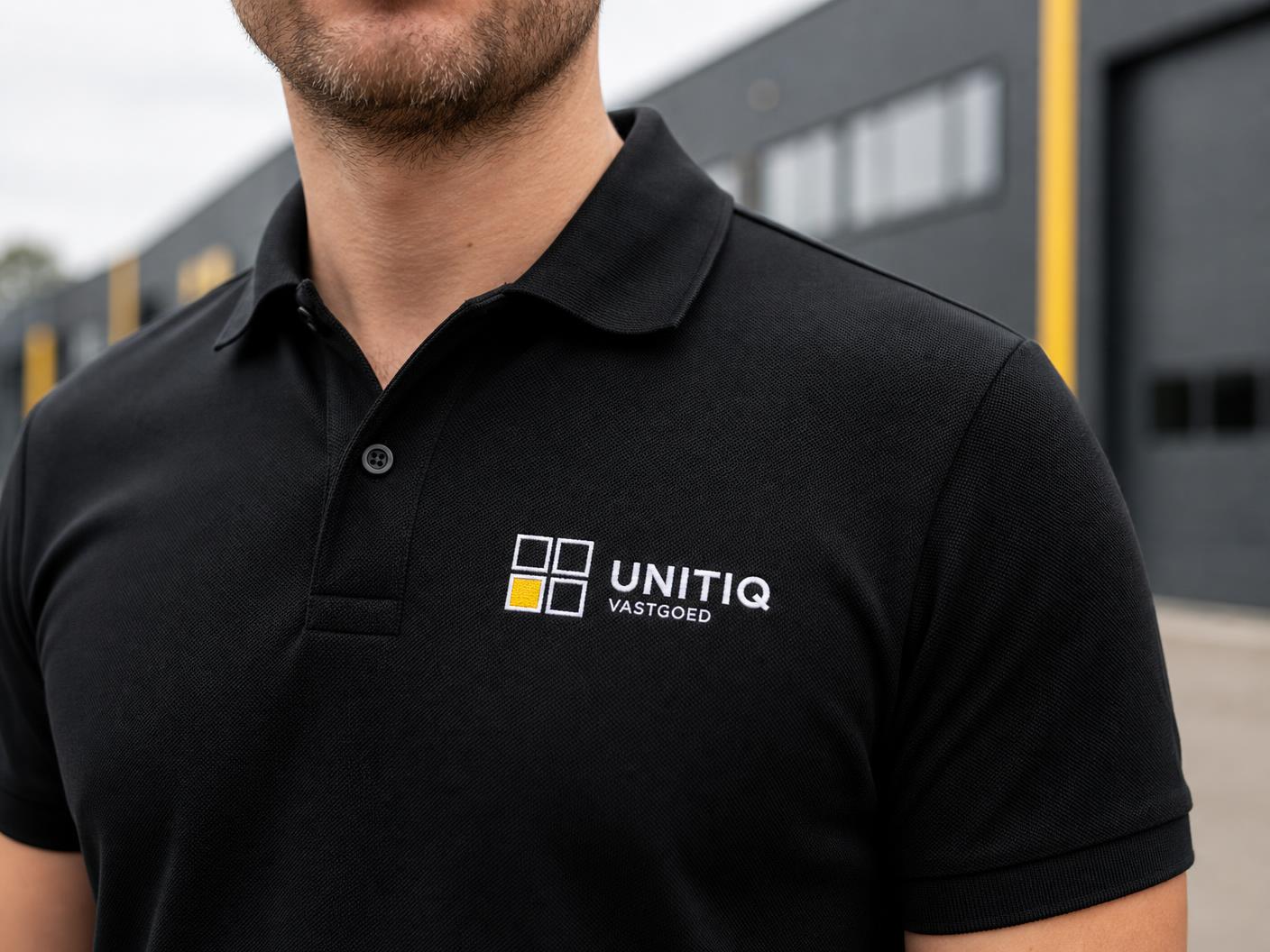
Workwear — black polo

Workwear — black polo

Black piqué polo with the white logo small on the left chest. Calm and professional; the yellow unit in the mark is the only colour accent.

  • Position: left chest, 8 cm below the shoulder seam, 9 cm wide (embroidery) or 10 cm (transfer print).
  • For the garment printer: supply SVG (vector) so any size stays sharp. If the printer only accepts bitmaps, use PNG · PRINT (4800 px, transparent, well over 300 dpi at A3).
  • Colours: logo white #FFFFFF, accent unit signal yellow #F5C518 (approx. Pantone 116 C), fabric black.
  • Embroidery: use the white logo without the yellow accent if the supplier runs a single colour only.
  • Optional back print: wordmark 24 cm wide between the shoulder blades, or the QR code at 8 × 8 cm.

Garment print artwork (white logo)

Download
Background

SVG is the vector file: open or place it directly in Illustrator (Ai). Web = compact for screen, print = high resolution (300 dpi). SVG, PNG and WEBP export transparent; JPG always uses the selected background colour.

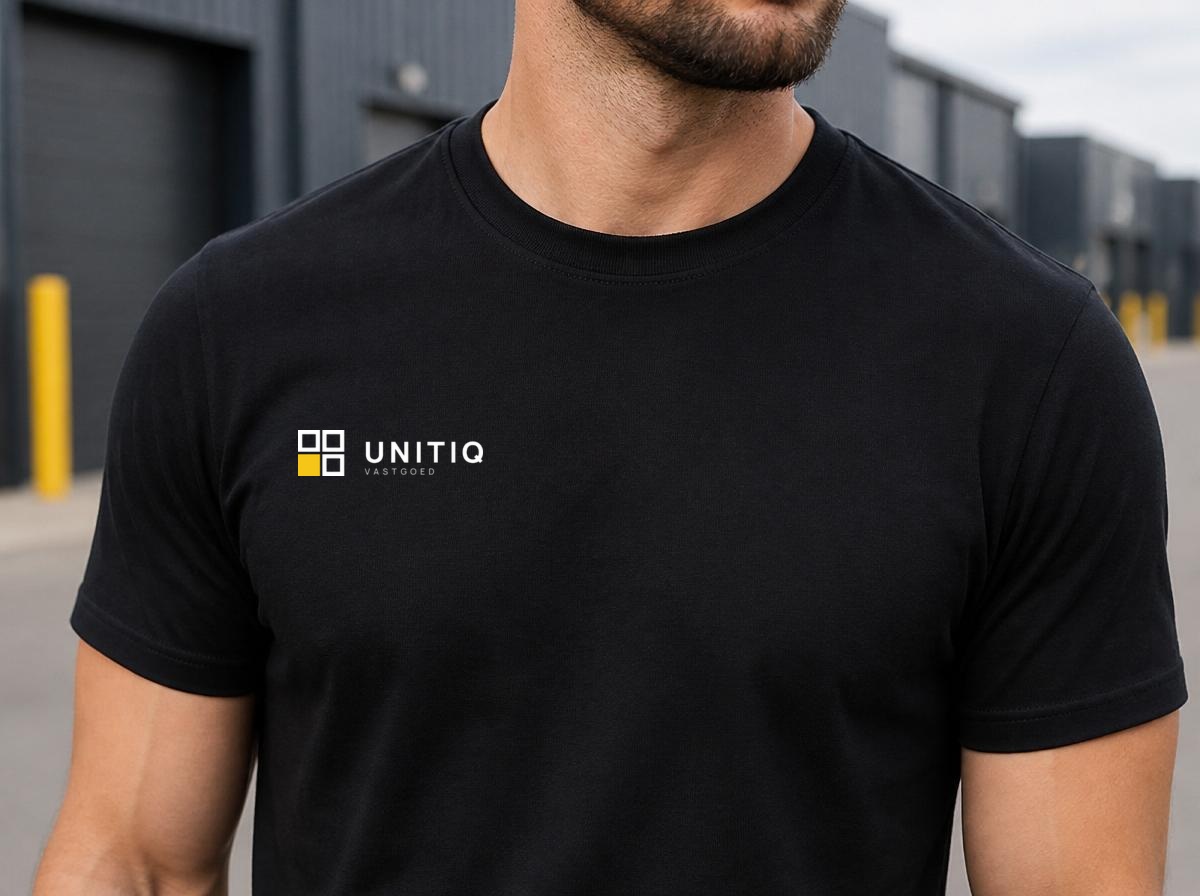
Workwear — black T-shirt (print)

Workwear — black T-shirt (print)

Black T-shirt with the logo small on the left chest, printed rather than embroidered. For trade fairs, site visits and team wear.

  • Position: left chest, 9–10 cm wide, top edge approx. 7 cm below the neck rib; simplified symbol next to the wordmark.
  • Technique: screen print (2 colours: white + signal yellow) or DTF/DTG transfer for small runs.
  • Artwork: SVG or PDF (vector) is always best; bitmap only? Use PNG · PRINT (4800 px, transparent) — well over 300 dpi at this size.
  • Colours: logo white #FFFFFF, accent unit signal yellow #F5C518 (approx. Pantone 116 C) on black cotton.
  • Single colour only? Supply the all-white logo without the yellow accent.

Shirt print artwork (white logo)

Download
Background

SVG is the vector file: open or place it directly in Illustrator (Ai). Web = compact for screen, print = high resolution (300 dpi). SVG, PNG and WEBP export transparent; JPG always uses the selected background colour.

Do

  • Only use the logo files and versions shown on this page.
  • Choose the version with the highest contrast on the background.
  • Always place the logo fully horizontal, without rotation.

Don't

  • Stretch or distort the logo, or rearrange the symbol separately.
  • Add colours other than charcoal, white and signal yellow.
  • Place the logo on a busy photo or in low contrast.
  • Add shadows, outlines or gradients.